Facebook users choice to use Timeline or Not

For How to Remove Facebook Timeline READ THIS ARTICLE

Every single person, organization and business using Facebook will be forced on March 30, 2012, WITHOUT CHOICE, to use a timeline that is not necessary, impedes communication, affects privacy and malfunctions. Once mass implemented on March 30, there is no deactivation of timeline.
Please sign, share this petition, I am test driving timeline now and as a tech and public relations, it impedes communication, shares information easily to the public and displays old posts that I have not posted.
The Facebook timeline has been put in place for business, organization and community pages. It is being forced upon people globally, as of March 30, 2012. The timeline hampers communication, is technically faulty, graphically heavy, and is not user friendly. Irregardless of how the technology functions, users do not have a choice. This is against net neutrality, an Internet principle that Facebook supports.
This petition will be delivered to:
1. Facebook Corporate Office | Headquarters, 1601 S. California Ave. Palo Alto, CA 94304, (650)543-4800
2. Facebook Corporate Office Headquarters HQ, 2012 1 Hacker Way Menlo Park, California 94025, Corporate Phone Number: 1-650-853-1300, Fax Number: 1-650-543-4801.
3. Facebook Corporate Office Headquarters, 156 University Ave. Palo Alto, CA 94301-1605, Corporate Phone Number: 1-650-543-4800, Corporate Fax Number: 650-543-4801.
Board Members:
Mark Zuckerberg, Founder, Chairman and CEO Facebook, Marc Andreessen, Co-founder, General Partner, Andreessen Horowitz, Jim Breyer, Partner, Accel Partners, Donald E. Graham, Chairman and CEO, The Washington Post Company Reed Hastings, Chairman and CEO, Netflix, Erskine Bowles, President Emeritus, the University of North Carolina, Peter Thiel, Partner, Founders Fund.
Facebook Executives: Mark Zuckerberg, Founder, Chairman and Chief Executive Officer, Sheryl Sandberg, Chief Operating Officer, and David Ebersman, Chief Financial Officer, press@fb.com
For further study into how Facebook Timeline affects your privacy please see EPIC: [Electronic Privacy Information Center] EPIC is trying to get the FTC to look further because Facebook is already under scrutiny for privacy issues of the past.

For How to Remove Facebook Timeline READ THIS ARTICLE
MuftPakistan.blogspot.com
By thenewstribe.

What You Can Do with Facebook Timeline

10 Things That You Can Do To Your Profile With Facebook Timeline By MuftPakistan.
One thing that is amazing about Open Source online applications is its level of growth and development for months and even weeks. Just recently, Facebook has changed how status updates are being displayed real time, and how recent stories are being looked at, with blue markers on the upper left section of the particular broadcast. And on September 22, 2011, Mark Zuckerberg, owner and CEO of Facebook, has announced that the Profile page will be changed and viewed in a different light. Facebook Timeline presents the profile in a way where the feeling can be like reading an online journal. Since the application is quite new, you may need to read some tips on how to use it and make the most of the timeline so that your you can present your best self with friends, family members, or relatives, of your life in a scrolling nutshell.


fb introducing timeline 10 Things That You Can Do To Your Profile With Facebook Timeline
Choose Your Profile Cover
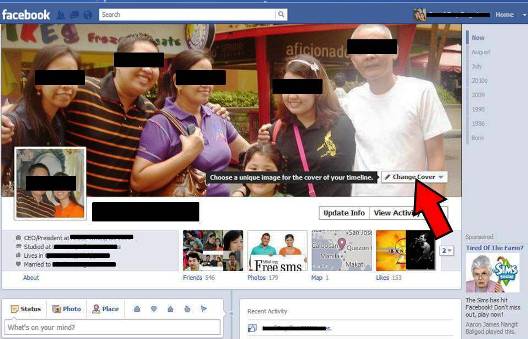
Tip 1 Choose Your Cover Profile 10 Things That You Can Do To Your Profile With Facebook Timeline
When you have your profile created, whether we are talking about Facebook or an offline profile or portfolio, the first thing you need to do is to prepare a cover page that would present you or your interest. You need to look for images that can make people think of what you are, in looking at one big picture. It may be your biggest highlight, your most recent achievement, a picture of your family, or a perfectly picturesque scene taken from your powerful camera. Your Cover picture is the window to your soul.


Update Your Info
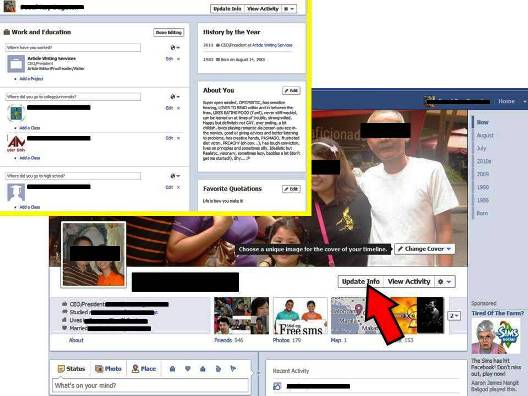
Tip 2 Update Your Info 10 Things That You Can Do To Your Profile With Facebook Timeline
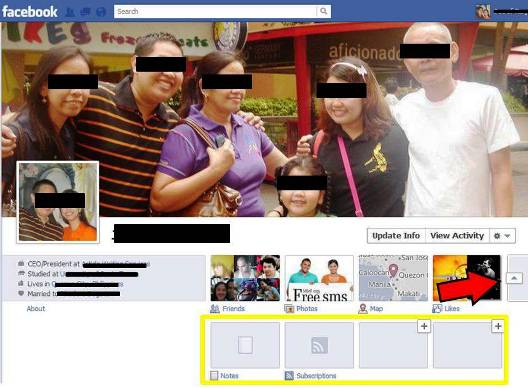
If there is, any other moment in time to update your personal information, then the time is now. That’s right. When someone looks at your profile, one of the first things that can be seen is your information, such as your place of work, your family, and non-family relationships, your language of expertise, educational achievements, and more. Nope, you do not need to update other sensitive details, as about 4 or 5 items will be shown at front. You can do this by clicking the “Update Info” button under the cover picture. Do not be surprised, as the update info section has also been improved, with that tile look.


To Show or Not to Show
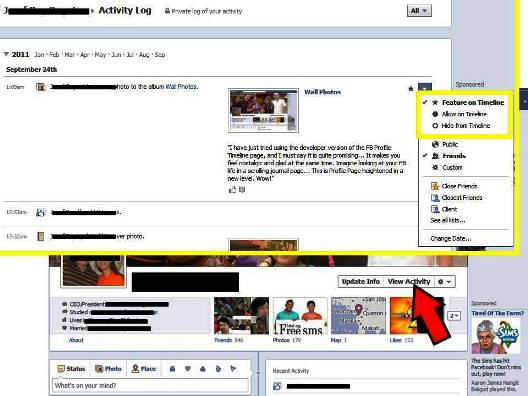
Tip 3 To Show or Not to Show 10 Things That You Can Do To Your Profile With Facebook Timeline
After updating your personal and professional information, another thing you need to do is to modify the timeline and select activities that you want to appear or not. As you click “View Activity”, everything that you have posted on your wall, including other activities that have been done on your wall for the last, well, since birth, will be shown. It cannot be avoided that there are great and terrible posts that may affect your image as a person. If you do see that event in the activity, then just click on the down arrow at the right end of the row, and you will have the option of whether you will include it on your timeline or not. This provides ease and comfort of sharing or hiding information as wanted, not unlike the previous profile update where you feel that an unwanted status feels like removing a spam, instead of just taking it away in your right as the account owner.


Modify your Navigation
Tip 4 Modify your Navigation 10 Things That You Can Do To Your Profile With Facebook Timeline
Usually, what you see on the profile wall is your friends, photos, maps, and likes, and other updates, being presented on the left part of the home page. It can be quite annoying that the subscriptions you really do not want, stays even if you are keeping on removing the subscription to keep you reminded with game updates, requests, and more. With the new Timeline, all these resets and the only things that will be seen are the generalized apps that you can add for viewing. Clicking the option button under Activity will bring you other windows where you can add notes subscriptions, and others.


Use the + Button
Tip 5 Use the + Button 10 Things That You Can Do To Your Profile With Facebook Timeline
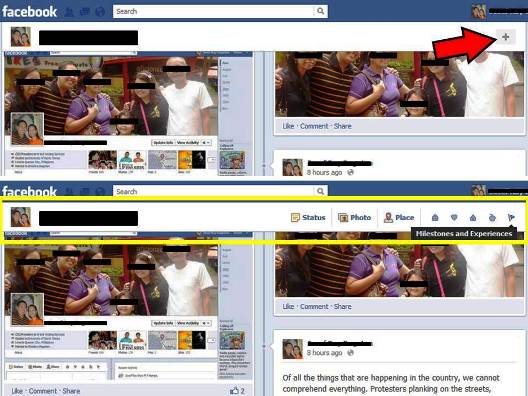
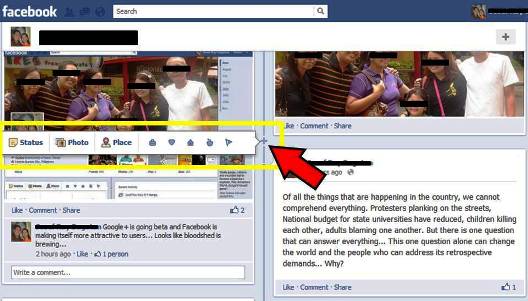
With the older profile wall setup, you may need to scroll back at the top of the page just for you to update some posts about anything, whether it would be pictures, links, and other things. When you utilize the + button, it will give you the same options included on the posting an update, uploading of a picture, or sharing unique status where the world is the audience. You can choose if the update has something to do with work, love life, living, health and wellness, and achievements of success stories.


Posting Comments, Status, can be Done anywhere in the Timeline
Tip 6 Posting Comments Status can be Done anywhere in the Timeline 10 Things That You Can Do To Your Profile With Facebook Timeline
When you recall the events that happened to you in the past, you may feel that you have remembered something you experienced before and have it posted on the timeline without sacrificing date allocation. Yes, this can all be possible and you can update as if you are just squeezing in some notes on a journal page, or a post it, for all who care. You can still use your old photos and other stuff to have it scanned and downloaded for online usage.


Star your Favorite events
Tip 7 Star your Favorite events 10 Things That You Can Do To Your Profile With Facebook Timeline
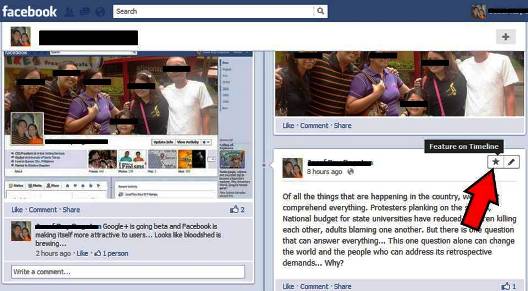
Setting your favorites is now a new thing in the timeline. When you look at a particular status on the wall, clicking the star means that status can be featured in the timeline. With the status divided into left and right sections, a featured event will occupy both sides and it will be highlighted by increasing the size of the page section by over an additional 50%, making it bigger than the rest. In case you change your mind, just clicking the star button on a featured page will make the particular status smaller again.


Optimize Your Apps
Tip 8 Optimize Your Apps 10 Things That You Can Do To Your Profile With Facebook Timeline
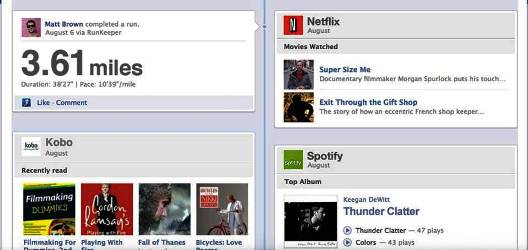
You may have used apps, about one or two maybe. You may have used Netflix and watched movies online, or tracked down your running path with Nike+ GPS. If you are used to seeing your apps alone, this time, things are a little different because everytime you open a music player, a recipe page, or playing Angry Birds via Facebook, you are not the only person who sees things happening, but every friend that has access to your timeline page. So setup your apps in a way that you can enjoy it more fully, as it is possible that you may start a trend of your own.


Time to Filter Your Friends
Tip 9 Time to Filter Your Friends 10 Things That You Can Do To Your Profile With Facebook Timeline
As you go down the timeline and back into your birthday, you will notice the pictures, faces, and the friends you have created via Facebook. You will come to know their names, and the beginning of friendships that grew over time. Since most users are more likely to accept friends that they do not know, it is sufficient to say that a user should take his time in sifting out friends that he actually knows who, rather than having a large number but only knowing about less than half, which may take too much feeding space.


Fill in the Blanks
Top 10 Fill in the Blanks 10 Things That You Can Do To Your Profile With Facebook Timeline
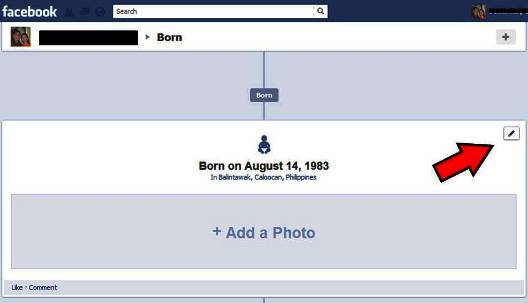
One of the amazing things about the Facebook Timeline is that some information on the profile is now merged with the actual timeline itself. A specific example of this is the birth part of the timeline. It already serves a challenge of its own as a person would have to find particular pictures when he was a baby. Sure, you can post your modern birth cover, but they can still see through it. No one would like to have their personal journal or profile page blank and insufficient with details. So now that you still have the time, and the ability to complete the profile, have every general, non-vital details filled in.

Thanks for reading

7 Ways To Play Facebook’s New Social Feedback Loop

7 Ways To Play Facebook’s New Social Feedback Loop
From all facebook! Facebook’s ticker, timeline, Open Graph and GraphRank create a feedback loop that drives social discovery, engagement, and targeting opportunities.

Here are seven suggestions on how to leverage these new features in marketing (by the way, in the graphic to the right, the word “flyouts” refers to pop-out window that opens when you click on an item in the ticker).

1. Get Onto the Graph

To participate in social story creation and promotion, you have to be part of the Open Graph.

These social stories show in the ticker each time a user performs an action in an application, and are then aggregated into the timeline.

When those actions form a social pattern, as identified by Facebook’s new GraphRank algorithm, they also gain more prominence in friends’ news feeds.

2. Go Beyond Pages

Marketers, especially brand marketers, have long relied on the fan page as their only real presence on Facebook.

It’s time to extend past this to create an experience that is truly social by design and conveys your brand identity.

Apps are more essential than ever to the latest Open Graph updates, as they are the centerpiece for story generation.

Without such an approach, you might find your messages are lost among all the real-time activity streaming from Open Graph apps into the ticker and news feed.

3. Focus On Experiences

By expanding beyond just the verb “like,” new opportunities open for marketers to bridge offline and online experiences.

Every offline experience and action that is inherently social can now be put online and be addressable.

Think about “driving a new car” or “sampling a new beer.”

Think about the verbs used when customers interact with your product, or owning your own verb (e.g., “Fedex a package”).

More important, however, is to integrate those actions and verbs into sharable and social experiences.

4. Analyze Your Audience

Dig deep into the patterns and trends of your customers and users.

Focus both on how they create stories and engage around your company as well as how their friends engage with those same stories.

Understanding what resonates, and what users ignore, is ultimately an essential step in managing your GraphRank.

A high GraphRank will build more relevance in friends-of-friends, and drive additional discovery via the news feed.

5. Use Sponsored Stories To Spread Brand Awareness

Stories that resonate best should be plucked out of the Ticker, in real-time, and sponsored to friends for greater impact via sponsored stories ads.

There is a wealth of new power to leverage in sponsoring “objects” you own (e.g. a baking brand can message out to anyone who has cooked lately via any app), as well as people who have “cooked,” “viewed,” or “eaten” their recipe.

6. Work GraphRank To Make Your Ads More Effective

Facebook is moving squarely into the field of intention-based advertising, by making explicit the specific types of connections users have to objects.

As such, coupling an understanding of what user stories drive engagement, with specific intentional verbs, is a powerful combination.

For instance, I can target in-market car buyers, as those who have test-driven lately.

While this intention based targeting may not have the same volume as a traditional campaign, when done correctly should yield higher engagement and pass-along rates.

Believe me, this is an area we’re digging very deep into, and we’ll have lots more to say and show here in the future!

7. Go Beyond The Click

Understand how your users behave once they are within your app, and not just how they got there initially.

At the most fundamental level, it is essential to understand the series of actions that drive engagement, and conversion.

By identifying patterns amongst your most avid users, finding their friends or others like them can be made possible by traversing the Graph.

Data that lives beyond the click is the key to unlocking value, and can be used to inform and drive more effective marketing both inside, and outside of, Facebook.

The marketing recommendations teased above take advantage of Facebook’s new social feedback loop, and are just the tip of the iceberg.

And in the words of Facebook Chief Executive Officer Mark Zuckerberg, we’re most anxious about what you can do with this next generation of the Open Graph.

How to Get Facebook's Timeline Without the Wait

How To Enable Facebook Timeline Right This Second or How to Get Facebook's Timeline Without the Wait!

Facebook announced the new profile, timeline, but the beta version doesn’t won’t come out until at least the end of this month, if not later, and you have to sign up for it in advance — but, there’s a way to activate it right now, without the wait.
i am going to show you how to do it

shopping safely on facebook

shopping safely on facebook
some tips regarding shoping safely and securely on facebook
If you’re selling anything on Facebook, you need to be worried about protecting your customer’s data.
And there’s plenty to worry about here: A recent ShopVisible survey found that two out of every five online retailers have been hacked.
Learning of a data breach can kill a shopper’s trust in a retailer, but taking extra security can mitigate that.

Facebook pages can be hacked


Facebook pages can be hacked!

Be very careful about giving anyone administrator privileges for your Facebook page.
So warns Sophos. The security company pointed out today that anyone you give admin rights to could delete the page creator from the list of administrators.

A Facebook Feature Everyone Should Activate


Facebook recently unveiled
the most dramatic updates to its privacy settings in a year. Out of all of them, there’s one new feature that you really must turn on as soon as it becomes available to you: profile review.
Here’s how to

the biggest posting mistake by users on facebook

the biggest posting mistake by users on facebook!
What if there were a way to post to Facebook that would reduce your interactions with fans by up to 70 percent? You’d want to avoid that, wouldn’t you?
As you may know, lower interaction rates result in less visibility in the news feed. Fewer of your fans see you, and

MuftPakistan.com Sign up for FREEUpdates.